
Best practices
Performance
Optimize replication throughput, flow control, horizontal scale, and recovery concurrency for Easy Hybrid DR.
- Product
- Easy Hybrid DR
- Version
- v2.3.1
- Release status
- GA
- Documentation status
- Published
- Last updated
- Updated
- Reading time
- 1 min read
Easy Hybrid DR performance depends on the full replication pipeline, not only link bandwidth. Source reads, changed-block processing, network transfer, validation, cloud-native storage writes, and checkpoint finalization all contribute to effective throughput.
Replication flow control model
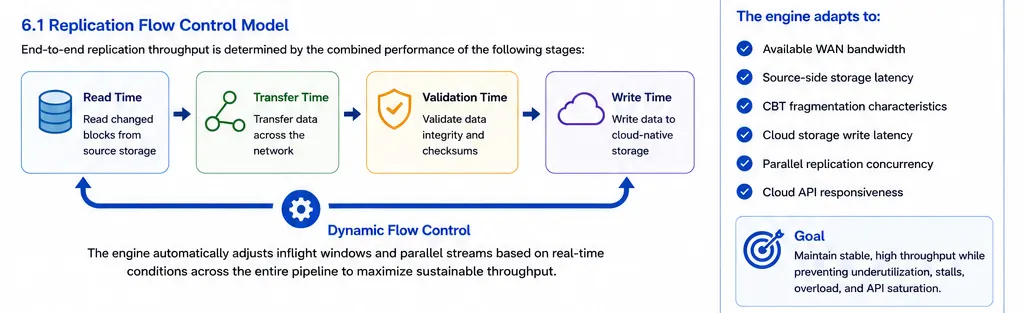
The replication engine adapts to:
- Available WAN bandwidth
- Source-side storage latency
- CBT fragmentation characteristics
- Cloud storage write latency
- Parallel replication concurrency
- Cloud API responsiveness
This helps maintain stable throughput while preventing network underutilization, storage-write overload, replication stalls, excessive inflight memory growth, and cloud API saturation.
Performance test scenario
The following internal validation scenario demonstrates the shape of a large parallel replication test.
| Parameter | Value |
|---|---|
| Source platform | Azure |
| Target platform | AWS |
| Replication topology | Azure to AWS |
| Replication Nodes | 1 |
| Protected VMs | 40 |
| Protected disks | 80 |
| Replication interval | 20 minutes |
| Average changed data per disk | 700 to 800 MB |
| WAN bandwidth | 500 Mbps, burstable to 700 Mbps |
| Observed sustained throughput | Approximately 420 Mbps |
The engine maintained approximately 70 percent of practical WAN capacity while handling parallel disk replication, fragmented CBT workloads, multiple simultaneous VM streams, and continuous cloud-native storage writes.
Tune for the bottleneck
| Symptom | Likely bottleneck | Action |
|---|---|---|
| Replication cycle duration exceeds the RPO interval | Insufficient node, network, or target write capacity | Add Replication Nodes, increase bandwidth, or reduce workload concurrency per plan. |
| WAN is underutilized | Source read pressure, fragmented CBT, or low parallelism | Check source storage latency, CBT fragmentation, and parallel disk assignment. |
| Replication stalls during target writes | Cloud storage latency or API throttling | Review cloud throttling metrics and distribute workloads across additional nodes. |
| Node memory pressure increases during replication | Inflight windows are too large for current write conditions | Reduce concurrency or split workload groups across nodes. |
| Recovery jobs queue during failover | Cloud quota, API, or Prep Node concurrency limits | Stage recovery by protection plan and prepare quota increases before the event. |
Performance best practices
- Group workloads by RPO, churn, and source platform behavior.
- Stagger replication schedules for large environments.
- Add Replication Nodes before cycle duration consistently reaches the RPO interval.
- Keep high-churn database and VDI workloads in smaller workload groups.
- Monitor source storage latency, cloud write latency, retry rates, and API throttling.
- Validate quota readiness before production onboarding and before large DR drills.
- Use staged recovery orchestration for massive failovers.
Recovery concurrency
Parallel recovery depends on attached disk capacity for Prep Nodes, cloud API throttling, compute instance quotas, and network provisioning concurrency.
For scaled recoveries, use higher-capacity Prep Node configurations when more than the default attached disk count is required. Plan recoveries in protection-plan batches and pre-validate target cloud compute quotas.
Related docs
Was this page helpful?